
To-Do List & Calendar: Cale1.0.4 - App Store
You'll be able to see results in few seconds.
Publisher Description


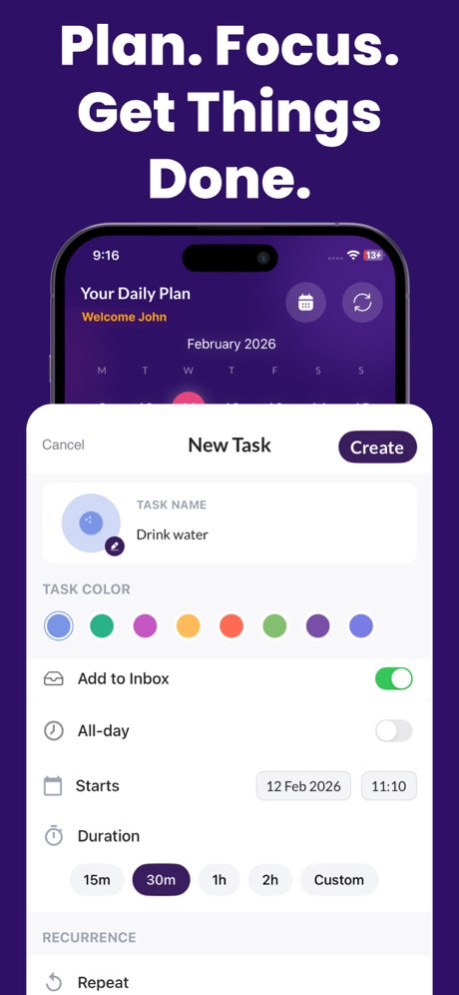
Stay organized with a fast to do list, smart reminders, and a clean calendar planner in one simple app. Cale helps you plan your day, manage tasks, and track important events with countdowns, so you never miss what matters.
Whether you need a daily planner, a weekly planner, or a lightweight task manager, Cale keeps your schedule clear and your time under control.
All-in-one Planner + Reminder App
Create tasks in seconds, set due dates, and get reliable notifications. Use Cale as your reminder app for work, school, and personal life.
--> Key Features
. To Do List & Checklist: Create checklists for groceries, routines, packing lists, and more
. Calendar Planner: See tasks and events in a calendar view to plan ahead
. Reminders: Set one-time or repeating reminders for deadlines and daily tasks
. Schedule Planner: Organize your week with a simple planning flow
. Daily Planner & Weekly Planner: Plan today, review your week, and stay consistent
. Habit Tracker: Track habits and build routines with simple progress tracking
. Pomodoro Timer / Focus Timer: Stay focused with a timer for deep work and study sessions
. Goal Planner: Break big goals into smaller tasks and milestones
. Time Management Tools: Prioritize tasks and keep your day on track
. Countdown: Track upcoming trips, birthdays, exams, launches, and important dates
Perfect for
. Study planner for students (assignments, exams, routines)
. Work planner for professionals (meetings, deadlines, priorities)
. A personal planning app for errands, habits, health, and home tasks
. Anyone who wants a clean task manager with calendar + reminders
Cale is designed to stay out of your way while keeping you organized. Add tasks quickly, plan your schedule, and finish more with less stress.
Download To-Do List & Calendar: Cale and start planning today.
Privacy Policy: https://sites.google.com/view/cale-dailytaskreminder/privacy-policy
Terms & Conditions: https://sites.google.com/view/cale-dailytaskreminder/terms-conditions
Version History Bug fixes and performance improvements to make your To-Do List & Calendar Tracker faster, more stable, and easier to use. 1.0.4 Feb 13 Bug fix on while creating Task. 1.0.3 06/02/2023 Allowed user to create SubTask,
Improved User Experience,
Fixed crashes while creating Tasks. 1.0.2 05/30/2023 UI improve, bug fix 1.0.1 05/30/2023 1.0 05/28/2023
About To-Do List & Calendar: Cale
The company that develops To-Do List & Calendar: Cale is GREWON TECHNOLOGIES PRIVATE LIMITED. The latest version released by its developer is 1.0.4.
To install To-Do List & Calendar: Cale on your iOS device, just click the green Continue To App button above to start the installation process. The app is listed on our website since 2026-10-13 and was downloaded 0 times. We have already checked if the download link is safe, however for your own protection we recommend that you scan the downloaded app with your antivirus. Your antivirus may detect the To-Do List & Calendar: Cale as malware if the download link is broken.
How to install To-Do List & Calendar: Cale on your iOS device:
- Click on the Continue To App button on our website. This will redirect you to the App Store.
- Once the To-Do List & Calendar: Cale is shown in the iTunes listing of your iOS device, you can start its download and installation. Tap on the GET button to the right of the app to start downloading it.
- If you are not logged-in the iOS appstore app, you'll be prompted for your your Apple ID and/or password.
- After To-Do List & Calendar: Cale is downloaded, you'll see an INSTALL button to the right. Tap on it to start the actual installation of the iOS app.
- Once installation is finished you can tap on the OPEN button to start it. Its icon will also be added to your device home screen.
Program Details
System requirements
Download information
Pricing
Version History
version 1.0.4
posted on 2026-10-13
Version History Bug fixes and performance improvements to make your To-Do List & Calendar Tracker faster, more stable, and easier to use. 1.0.4 Feb 13 Bug fix on while creating Task. 1.0.3 06/02/2023 Allowed user to create SubTask,
Improved User Experience,
Fixed crashes while creating Tasks. 1.0.2 05/30/2023 UI improve, bug fix 1.0.1 05/30/2023 1.0 05/28/2023
version 1.0.4
posted on 2026-02-13
Bug fixes and performance improvements to make your To-Do List & Calendar Tracker faster, more stable, and easier to use.
version 1.0.3
posted on 2023-06-02
Jun 2, 2023
Version 1.0.3
Bug fix on while creating Task.
Disclaimer
Official App Store Link
We do not host To-Do List & Calendar: Cale on our servers. We did not scan it for viruses, adware, spyware or other type of malware. This app is hosted by Apple and passed their terms and conditions to be listed there. We recommend caution when installing it.
The App Store link for To-Do List & Calendar: Cale is provided to you by apps112.com without any warranties, representations or guarantees of any kind, so access it at your own risk.
If you have questions regarding this particular app contact the publisher directly. For questions about the functionalities of apps112.com contact us.
